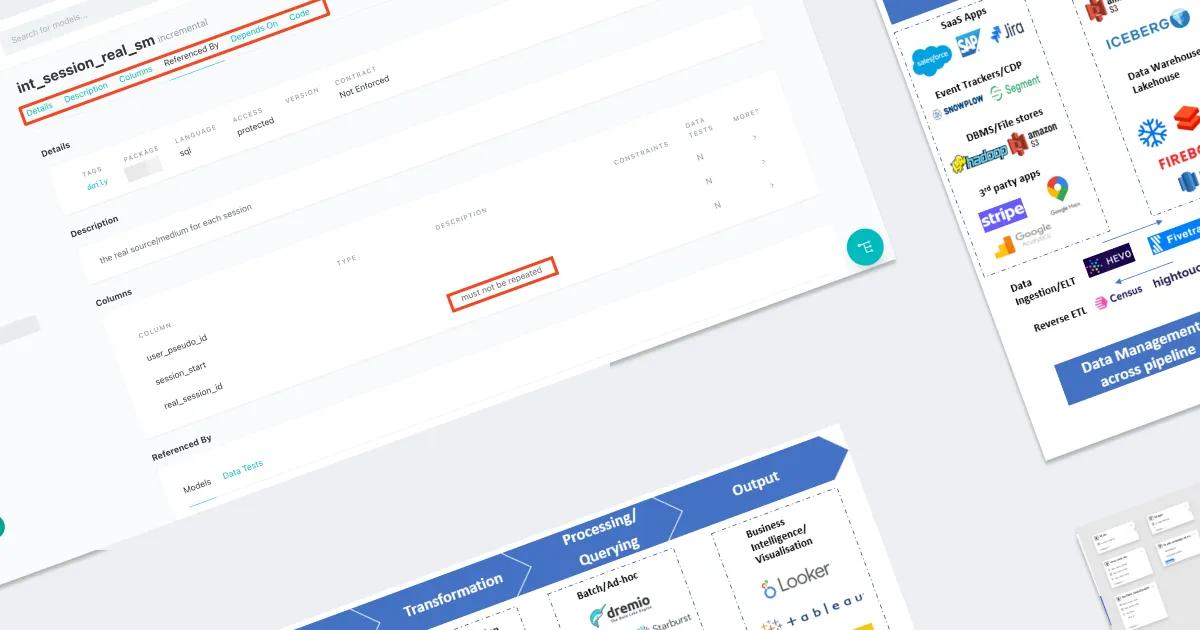

I truly love DBT.
It is a tool that makes an analyst’s life easier, but it’s not just about that. By learning DBT, you’re not only mastering a new tool – you begin to understand how to work with data more effectively overall. That’s why I strongly want as many of my colleagues as possible to also explore DBT and recognize its value.
As you get acquainted with DBT, you will encounter key principles of working with data: how to structure it, manage it, build a clear and flexible data model, execute scripts in a specific order, work with documentation, and much more. This is not just about SQL transformations—it is a way to dive deeper into analytics and its professional environment. And if, after reading this article, you feel motivated not only to master DBT but also to explore other data analytics tools, then I have achieved my goal.
0. A Brief Introduction
Many of us entered this profession from other fields, such as marketing, targeted advertising, sales, logistics, or finance. Often, the first steps in web analytics take place within a single ecosystem—usually Google’s. This is convenient: Google Analytics 4, Google Tag Manager, Google BigQuery, Looker Studio (by Google)—all the tools are interconnected, easy to configure in a few clicks, and provide quick results. However, such knowledge isolation creates a problem: a specialist sees only what is inside a single ecosystem and does not always understand what happens beyond it.
In reality, beyond this ecosystem, there is a vast world of tools that form what is known as the Modern Data Stack—a modern approach to working with data that utilizes the best solutions for each stage of data processing. One of the key components of this stack is DBT (Data Build Tool). It is responsible for the transformation process in ETL/ELT workflows (the "T" in ETL/ELT), helping to structure, test, and manage data models using software engineering principles.
If you try Googling Modern Data Stack, you will likely come across hundreds of different tools (one such example is shown in the screenshot below, taken from a Medium article on Key Trends in Modern Data Stack). This can seem overwhelming—dozens of logos, complex diagrams, endless stack variations… So how do you make sense of it all?
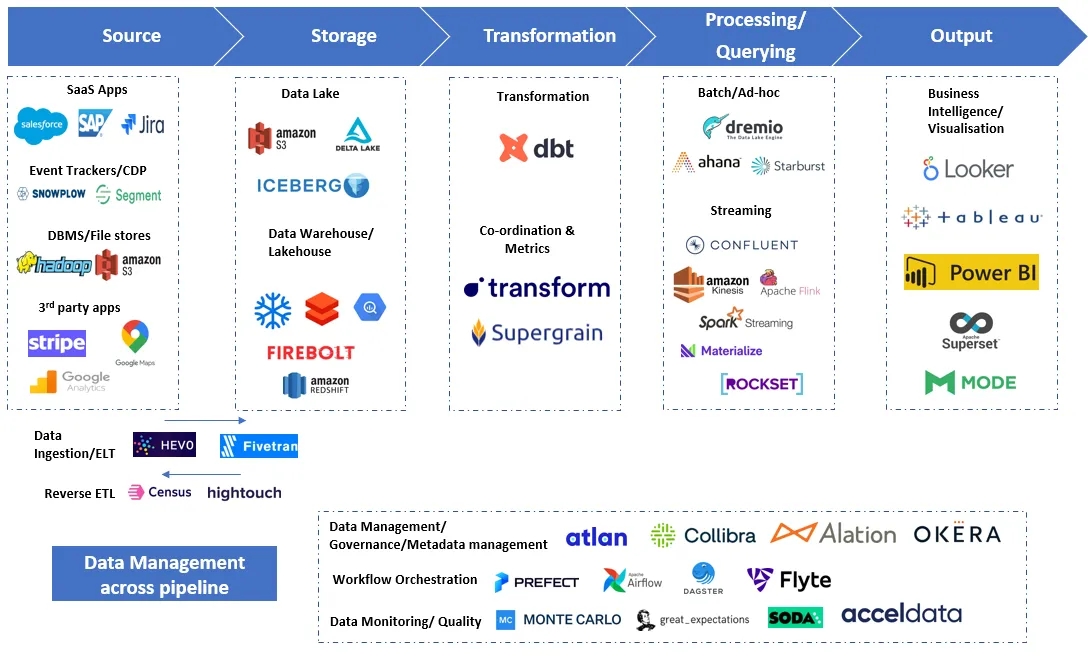
In fact, if you take a closer look at all these diagrams, you will notice that they are divided into blocks: Source, Storage, Transformation, Processing, Output. These are specific stages of working with data, each performing its key function. If we simplify the logic (and I intentionally oversimplify it for better understanding, as the actual scheme is much more complex), we can reduce everything to the classic ETL or ELT model, which stands for Extract (retrieve data), Transform (process data), and Load.
And then, following the chain: Where does the Extract process retrieve data from? What tool performs the Transform? Where is the data loaded at the Load stage? All these tools, in one way or another, assume that data is extracted from a certain source, processed, stored again somewhere, and then sent for visualization.
It is at the Transform stage that DBT plays a crucial role. It is responsible for data transformation, making it clean, structured, and ready for analysis. That is why DBT is one of the key components of the Modern Data Stack, defining how data analytics is built in a modern company.
If you take another look at Modern Data Stack diagrams found in various articles, forums, or presentations, you will notice a clear pattern: DBT is almost always present. Some tools come and go, changing depending on the stack and team preferences, but DBT consistently remains part of the stack. This suggests that DBT is not just another tool but an industry standard used everywhere, regardless of the cloud platform or data warehouse.
Just a few days ago, I came across an article about popular data analytics tools from the past year, which once again clearly demonstrated how important DBT’s role is among them.
Moreover, even Google understands the importance of this approach and is trying to integrate a similar tool into its ecosystem—Dataform. Essentially, this is an attempt to create “its own DBT”, embedded into Google Cloud Platform. At the moment, its functionality in some aspects falls short of DBT, but the concept remains the same: managing data transformations through code. And this means that, once you master DBT, you will be able to adapt to Dataform just as easily, should it become the primary tool within the Google ecosystem.
Well then—are you ready to see a new horizon in your field? Let’s go!
(Just keep in mind—there is probably no turning back!)

So, DBT exists in two versions: DBT Cloud and DBT Core.
DBT Core is an open-source version (and, of course, free) that can be installed locally and run via the command line. It provides all the core functionalities of DBT: model creation, testing, and deployment via CI/CD. However, project setup and management are entirely the user’s responsibility.
DBT Cloud is a cloud-based service that simplifies working with DBT. It includes a user-friendly web interface, automated scheduling (scheduler), user management, integrations with data warehouses, and team collaboration support. The free version is available for a single user, while team access is paid. However, its cost is significantly lower than the benefits it provides.
Simply put, DBT Core is for those who want full control, independence, and flexibility (but this requires strong technical skills). Meanwhile, DBT Cloud is for those who prefer convenience and minimal setup, in other words, beginners who are just getting acquainted with DBT’s logic. It already includes pre-configured settings out of the box, and its intuitive interface helps users quickly understand how everything works.
Therefore, if you do not have advanced technical skills but want to learn DBT, I recommend starting with DBT Cloud. It allows you to quickly dive into the process without spending time on complex configurations.
While writing this article, I will use screenshots from both DBT Cloud and DBT Core. This is because some of DBT’s advantages are best demonstrated using the Core version. Although all these features are also available in Cloud, in some cases, they are more visually clear in Core.
Therefore, this article will include examples from both versions to accurately convey DBT’s functionality and highlight its key features.
I think this introduction is more than enough—it even turned out to be more extensive than planned. Now it’s time to move on to the advantages of DBT. There are indeed many, but to keep the material structured and digestible, I will highlight five key aspects that will help organize the information and explain each one in more detail.
- Data organization within a project
- Data quality control
- Script version control
- Orchestration
- A powerful learning platform
As you continue working with DBT, you will discover even more conveniences and features that will make your data workflows simpler and more efficient.
Data Organization Within a Project
A bad analyst is one who does not strive to organize and structure their data. When you have only 3–5 tables, it is still possible to keep track of where the data comes from, how different datasets are connected, and who they are intended for. However, as soon as the number of tables exceeds dozens, understanding everything without a clear structure becomes nearly impossible.
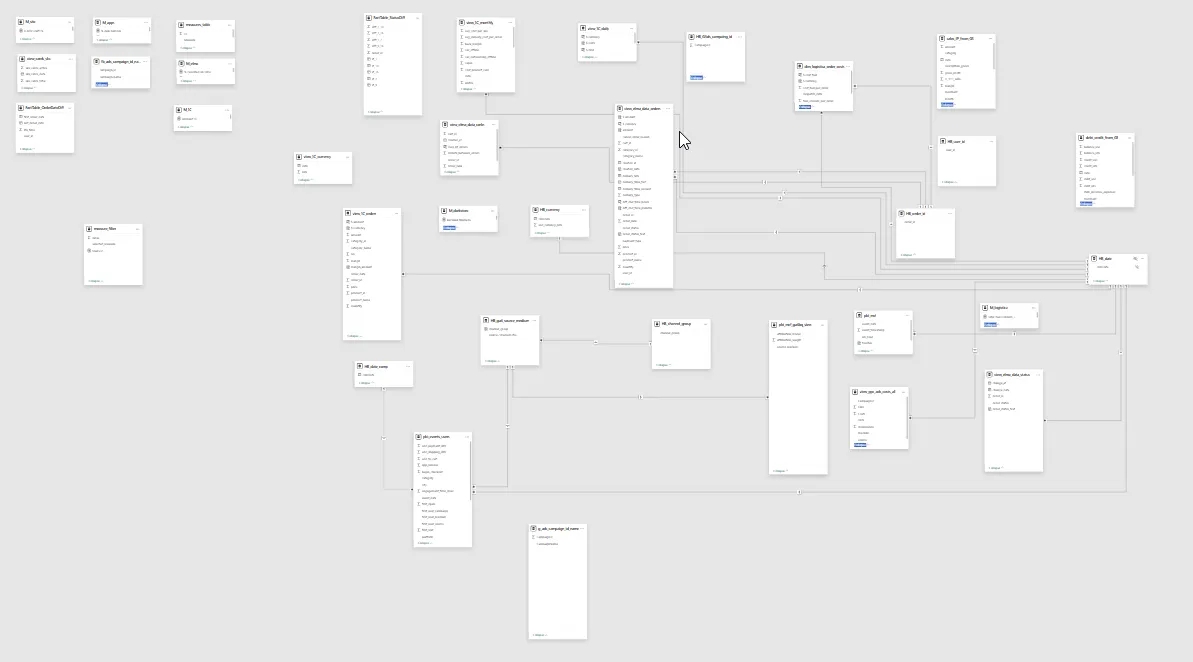
Without a unified system for organization, documentation, and understanding of the data schema, it is easy to get lost: What data is being received and from where? Which intermediate tables participate in generating final reports? Where is the data stored for different departments and end users? Without structure and documentation, an analyst’s work turns into chaos, and project maintenance becomes complex and costly.
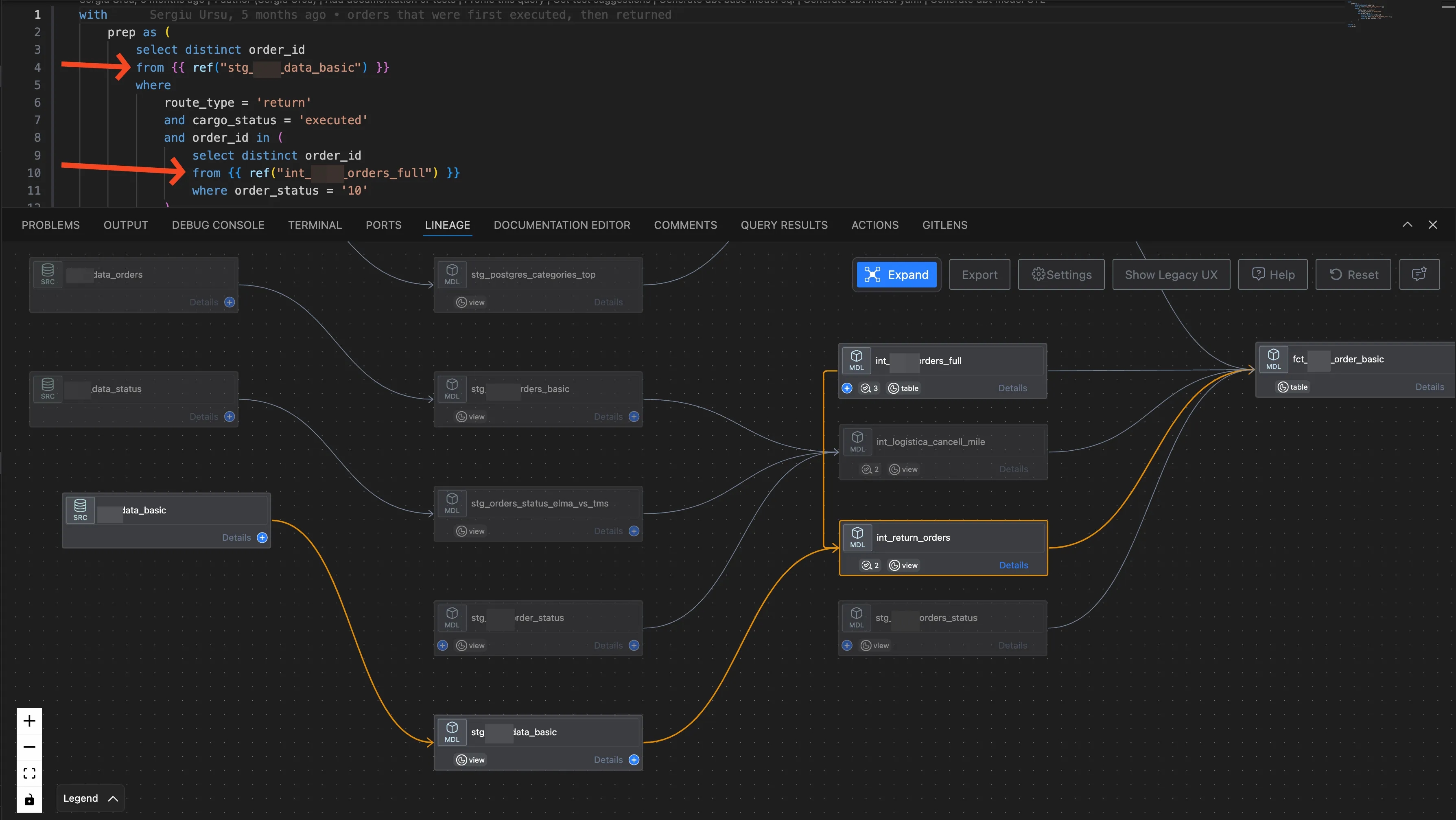
To structure data and understand the project architecture, DBT uses the {{ref}} function. Instead of referring directly to tables, it points to their names specified in metadata. This allows the entire project to be built as a single system, where it is clearly visible where the data comes from, what dependencies exist between them, and how they impact each other. This is not just a convenience but a key mechanism that helps maintain order in data and understand the structure of the entire project.
The screenshot below illustrates how these dependencies are defined directly within a query, as well as how the Lineage (data schema) visually represents the entire chain of tables and columns within them.
Also, as you become familiar with project organization in DBT, you will encounter an important concept: data layers. They help logically separate data processing stages and understand the role of each step.
Main data layers in DBT:
- Stage – raw but slightly cleaned and structured data that undergoes processing after being loaded from external sources.
- Intermediate – a transitional layer, where data is already enriched, normalized, and contains key dimensions and calculated metrics (Measures).
- Mart – the final data layer, where models are built for end users, BI tools, and dashboards.
Understanding the purpose of these layers helps to clearly define why each one is needed, what tasks it performs, and what benefits it brings. This also simplifies project maintenance and protects data from errors at every stage of transformation.
Data Quality Control
One of the key responsibilities of an analyst on a project is data quality control. It is not enough to simply collect data and pass it forward—it must first be cleaned and processed. To facilitate this, DBT provides a built-in testing functionality, which helps automatically validate data against predefined requirements. There are both standard built-in tests and the ability to create complex custom tests.
Standard tests include checks such as NotNull (values must not be empty), Uniqueness, and Range validation (values must be greater or smaller than a defined threshold). However, if necessary, more advanced tests can be created by adding logic and scenarios tailored to specific business requirements.
Tests can be defined directly in the .yml file (see the screenshot below), specifying which validations should apply to specific columns. Additionally, separate test models can be created to check, for example, metric accuracy or detect anomalies in the data.
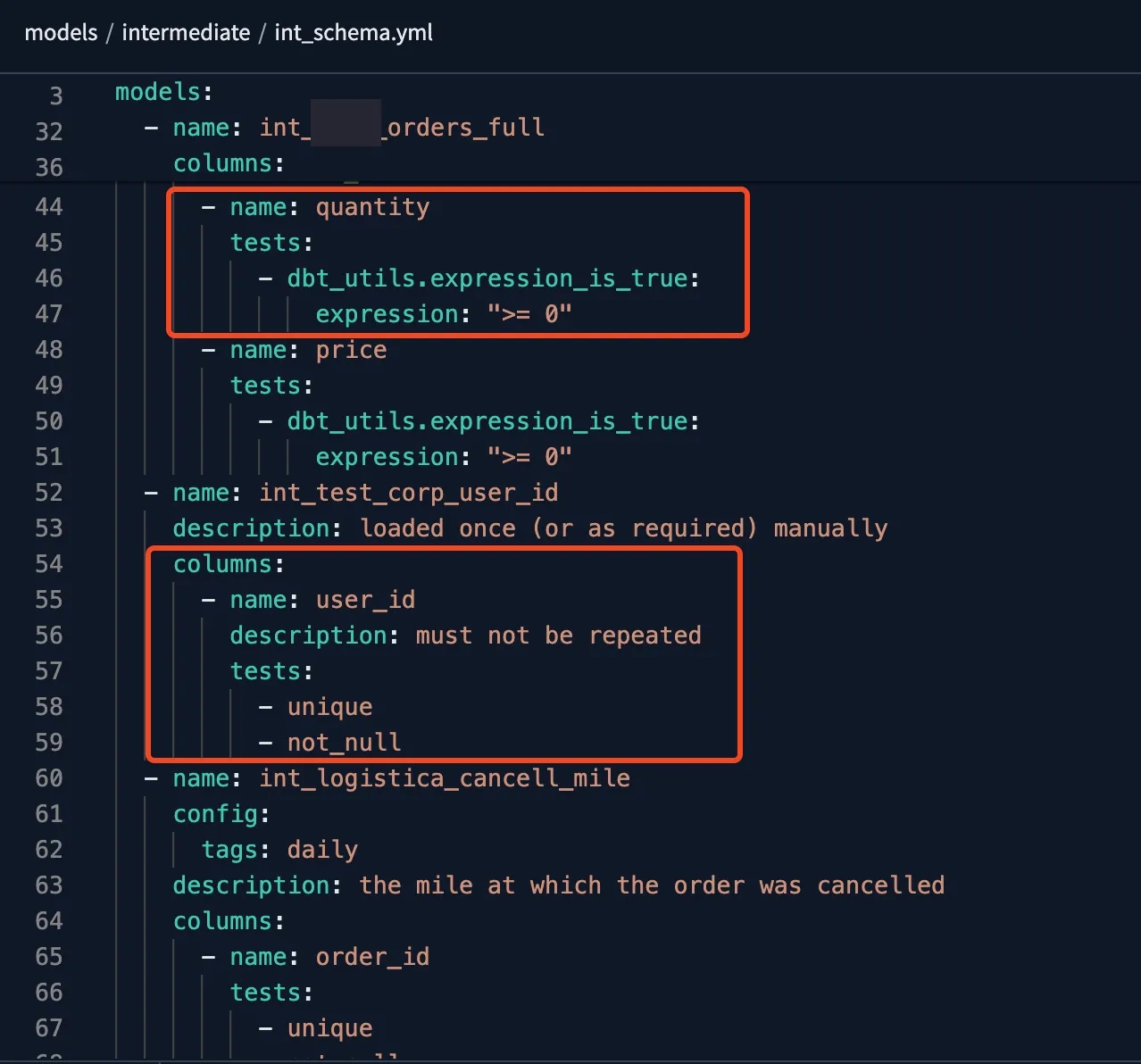
I again recommend starting with the basics—for example, using standard tests for uniqueness or range validation, defining them in the .yml file. Once you understand how they work and how to test them in different scenarios, you can move on to more complex tests. These are written as separate scripts and stored in the test folder, allowing you to check more advanced business logic within your data.
Data quality control also includes data freshness. In the .yml file that describes data sources, you can set a maximum allowed data age. If the data does not meet this requirement, DBT will issue a warning or an error (depending on the settings). This helps maintain data freshness and enables a quick response if the data becomes outdated or if new data is delayed.
Of course, you should avoid overloading a project with tests—it is important to focus only on critical checks. If you attempt to validate every piece of data, it may result in an overwhelming number of alerts, making your workflow more complicated. I usually apply standard uniqueness tests for resulting tables, as well as freshness validation for data sources. This approach ensures data integrity and relevance at the most fundamental level.
Just keep in mind that DBT offers significantly more possibilities for testing both the data itself and its freshness. Test configurations are conveniently managed and displayed in the .yml file, where they can always be reviewed, adjusted, or supplemented with new validation rules as needed.
Script Version Control
Explaining this advantage to a specialist unfamiliar with Git may be challenging, so it’s probably best to draw an analogy with Google Tag Manager, which most readers are familiar with. Think about how convenient it is in GTM to roll back to a previous container version when you need to check what changes were made a few days, weeks, or even months ago (see the screenshot below). You simply find the required version and restore it without manually retracing every step.
The same version control mechanism applies in DBT through GitHub or GitLab. Every change is logged, allowing you to view the history, revert to a specific state, compare changes, or review comments related to modifications. This provides flexibility, security, and transparency when working with code and data.
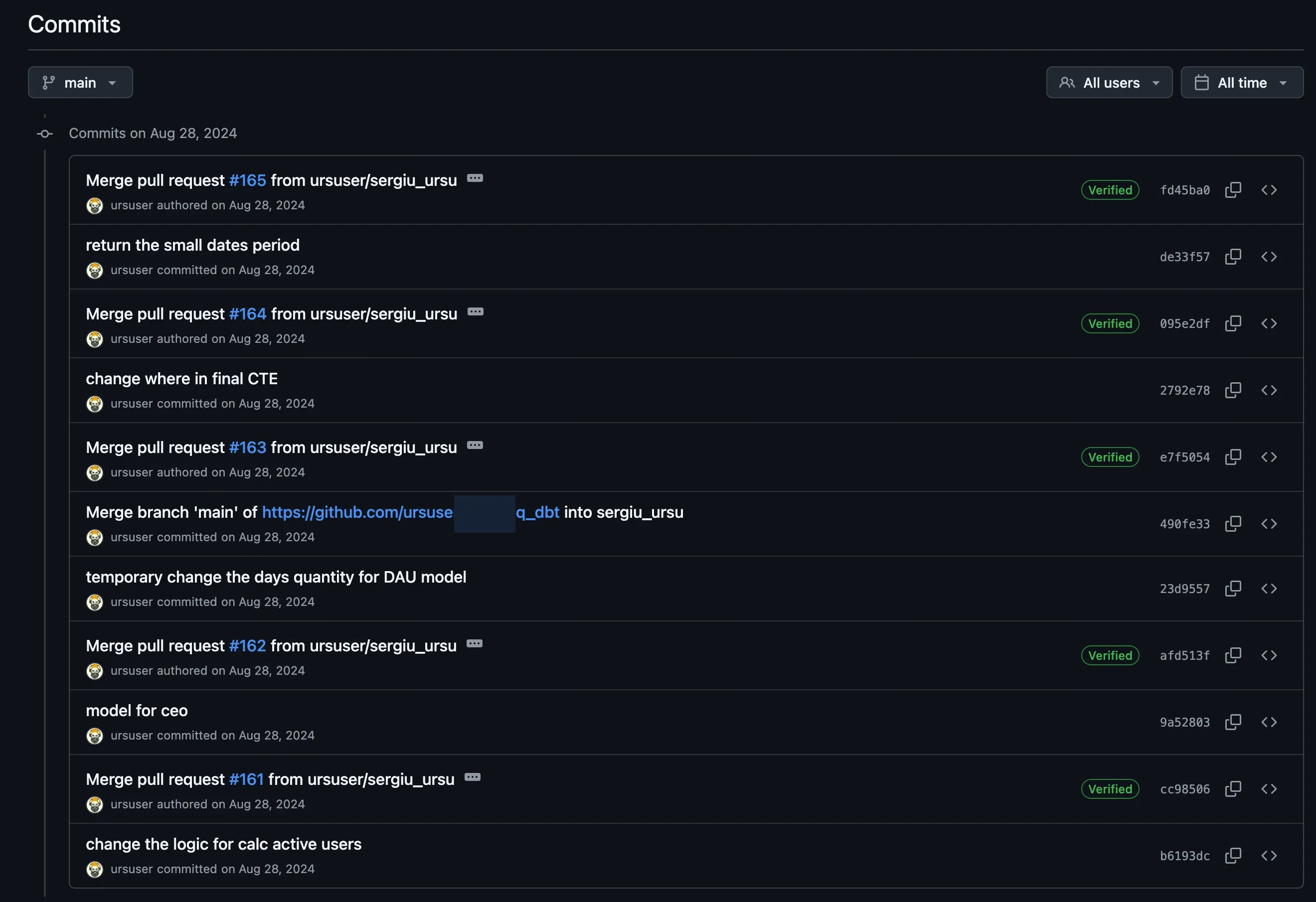
Even if you are working on a project alone, I still recommend using versioning, branches, and Git commands. This is not just a formality but a valuable practice that will help you understand how Git works and prepare for collaborative projects. When multiple analysts are involved in a project, each one works on their own branch, in their own environment, and with their own scripts. Version control helps avoid conflicts, track changes, and manage the development process. Additionally, it provides insight into how analysts operate in large companies, where workflows are based on collaborative development and strict change management.
Another key advantage of working with different branches and environments is the ability to separate DEV and PROD environments. The entire process is structured as follows: initial changes are made in DEV, tested, sent to Git, and then deployed from Git to PROD. This helps avoid errors in PROD, as all changes go through verification before being pushed to the live environment. This approach helps understand how to work conflict-free, without affecting working scripts or disrupting data in the production environment.
And here comes the logical question: why do I need all this if I work alone? If I am a freelancer, I have no analyst colleagues, no team on the project, then why should I bother with Git, versioning, environments, and branches? And the answer is simple: these are skills you will most likely need in the future if you plan to develop in data analytics, data engineering, or related fields. Look at job postings on popular websites, and pay attention to requirements such as Git, DBT, and working with the command line. Most likely, after this, you will no longer wonder why you need these skills. And once you understand this process, it will become so logical and natural that it will be difficult to imagine working any other way. You will start noticing which risks can be avoided by following the correct workflow: testing in DEV, committing changes to Git, and only then deploying them to PROD. Work becomes structured, secure, and predictable, while the process itself becomes much more convenient and transparent.
Orchestration
So, you’ve written all your 100,500 scripts (which, by the way, are called models in DBT), organized them into folders, accounted for all the layers—Stage, Intermediate, Mart—and everything looks structured and logical. Now it’s time to figure out how to execute them: How do you schedule their runs? In what order should they be executed? Which scripts should run first? Which ones should only run after certain data updates? For this, DBT has JOBs (or, in other words, orchestration).
JOBs in DBT are highly flexible and can be triggered based on various parameters. They can be configured to run only specific folders or model chains, execute an entire folder, but exclude certain models if they are not required in a particular scenario.
Additionally, tags can be used to group models by logic and run them when needed. Most importantly, a JOB takes into account the {{ref}} function inside models and executes them in the correct order. It follows the dependency chain, starting from the first model on which others depend and progressing to the last one. This means that DBT will not run intermediate models if their source data has not yet been processed. This approach ensures data integrity and prevents situations where calculations rely on outdated or incomplete data.
Another major advantage of JOBs is logging. If something goes wrong, a script fails to execute, or an error occurs, you can always check the log, find the issue, fix it, and restart the process. This makes debugging much easier and allows you to quickly respond to failures in the data pipeline.
The screenshot below shows a real-life scenario. A client reported that yesterday’s data was not updated and asked me to investigate. All I had to do was open the relevant JOB, check its logs, review the errors, and immediately identify which line caused the failure, why the script didn’t run, and why the data wasn’t updated.
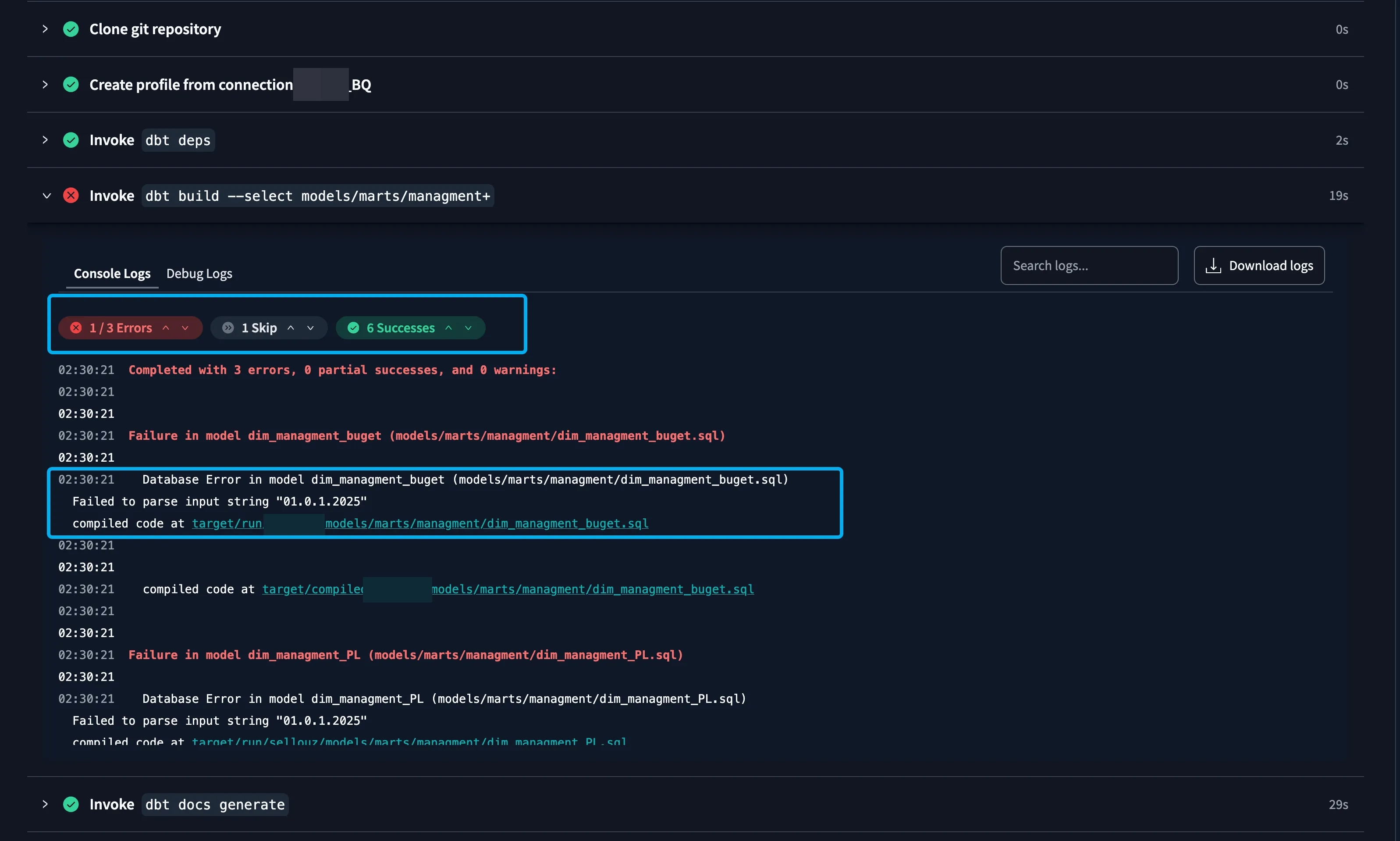
In case of errors during JOB execution, email notifications can be configured, allowing you to quickly learn about failures and take immediate action. This notification mechanism makes the process more reliable, as you won't miss critical errors and can fix them in time, without waiting for someone to notice a data issue. This is extremely convenient and useful, especially in a production environment.
A JOB in DBT performs multiple tasks at once. At the scheduled time, it connects to GitHub, fetches the latest version of the code, executes it, and connects to the database. Then, it creates or updates tables, forming new data in production, and also generates documentation (which is especially crucial for large projects!) that reflects all recent changes.
Documentation (see the next screenshot) in DBT is generated as an interactive website with clickable elements. You can navigate between models, tables, configurations, and data layers, as well as view dependencies, scripts, and tests. The entire project structure becomes transparent and easy to understand, and most importantly, this documentation can be easily shared with clients via a link, so they can explore how their project is structured on their own.

At the same time, the entire process is logged, so you can always track which execution stages were successful, where errors occurred, and what exactly happened during the data update. Isn’t that magic!?
A Powerful Learning Platform
So, let’s assume I’ve convinced you to dive into DBT—to understand how it works, what its capabilities and advantages are, and how this tool can benefit you specifically. Now, the logical question arises: Where can you learn it? What resources will help you grasp the fundamentals of DBT, and where should you start to quickly immerse yourself in the logic of the tool?
Once again, one of DBT’s greatest strengths is its extensive learning base. There are countless courses, articles, documentation, step-by-step tutorials, and video materials that thoroughly explain how to work with DBT across different systems and databases. You can find ready-to-use setup guides, breakdowns of various functions, and usage examples from a wide range of specialists, making the learning process as accessible and understandable as possible. Regardless of your experience level, you will always find resources to help you master DBT.
Here is a page with all DBT courses, created by the tool’s developers and its official representatives. On this resource, you can select your database, development stage, and knowledge level, which will help you adapt to the tool more quickly.
I recommend starting with "DBT Fundamentals"—a beginner-friendly course that explains the core principles of working with DBT. After that, you can move on to studying your specific database and try setting up small models in a test project to reinforce your knowledge through practice.
DBT also has a huge community, where the best solutions are discussed, complex cases are analyzed, and debates on relevant topics take place. There is a DBT forum where you can find answers to frequently asked questions, as well as Telegram channels, Slack communities, and Discord groups, where professionals share experiences, discuss new features, and help each other solve complex challenges.
This is an entire ecosystem of specialists who actively use DBT in their work and are always ready to provide insights and share how they tackled similar problems. So, if you have questions or want to learn about DBT’s best practices, you will always be able to find an answer. The most important thing is your willingness to learn, and there are plenty of resources available to master this tool.
Well, I would like to say that this is everything I planned to cover, but after reviewing the article one more time, I realize that I haven’t even scratched the surface. In fact, there is enough material here for a small book, and if we were to dig even deeper, this article could go on forever. So, I will pause here, leaving the uncovered features and tools for you to explore on your own.
I haven’t yet touched on macros, seeds, different table materializations, the semantic layer, Jinja scripting, packages, and much more. But all of this information is available on the course page, where each of these topics is covered in detail, so you always have the opportunity to dive deeper and find the answers you need.
All that’s left for me is to wish you success in learning DBT and to envy the new horizons of knowledge that await you. I truly hope that this will become the next step in your journey as an analyst, guiding you toward data engineering and a deeper understanding of data processing principles.
Loading comments…